Unlocking AI's Potential: A Beginner's Guide to the Model Context Protocol (MCP)
Dev Narang
January 2026
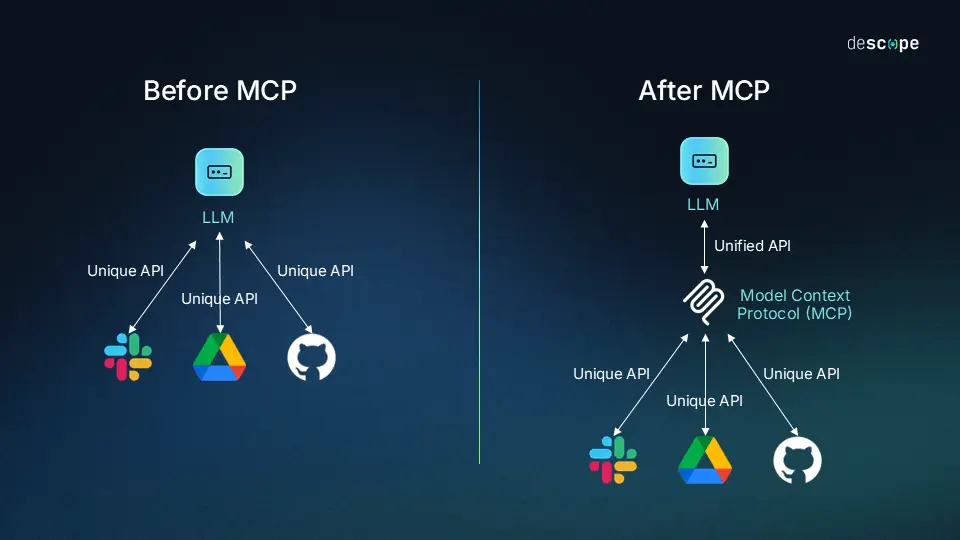
Unlocking AI's Potential: A Beginner's Guide to the Model Context Protocol (MCP)
In the rapidly evolving world of Artificial Intelligence, Large Language Models (LLMs) like Claude and GPT-4 are incredibly powerful "brains." However, these brains often live in a jar—disconnected from your local files, your databases, and your daily tools. Historically, connecting an AI to a new data source meant writing custom integration code for every single application. It was a fragmented, messy ecosystem.
Enter the Model Context Protocol (MCP).
The Core Idea: USB-C for AI
Think of MCP as a universal standard, much like a USB-C port for AI applications. Before USB, we had a different cable for printers, mice, keyboards, and cameras. Now, one standard connects everything.
MCP does the same for AI. It provides a standard way to connect "AI Clients" (like the Claude Desktop app or an IDE like Cursor) to "MCP Servers" (which provide data and tools).
How It Works
The protocol operates on a simple Client-Host-Server architecture:
- MCP Host (The Interface): This is the application you interact with (e.g., Claude Desktop, Zed, or a custom app). It wants to access data but doesn't know how to talk to every database in the world.
- MCP Client (The Connector): This component maintains the connection (1:1 or 1:Many) between the Host and the Servers.
- MCP Servers (The Doers): These are lightweight programs that expose three things:
- Resources: Data that can be read (like files, logs, or database rows).
- Tools: Functions that can be executed (like "search_web" or "send_email").
- Prompts: Pre-defined templates to help the AI use the server effectively.
Why This Matters
The beauty of MCP is write once, run anywhere. If you build an MCP Server for your internal company database, that same server can immediately be used by Claude Desktop, Cursor, or any other MCP-compliant tool. You don't need to rebuild the integration for each new AI assistant that comes out.
For developers and users alike, this shifts the focus from "how do I connect this?" to "what can I build?". It transforms AI from a passive chatbot into an active agent that can safely and securely interact with your real-world environment.
The Rise of Agentic AI
This is where things get really exciting. Agentic AI represents the next evolution beyond simple chatbots. Instead of just answering questions, agentic AI systems can:
- Take Action: Execute functions, modify files, send emails, query databases
- Make Decisions: Choose which tools to use and when based on context
- Maintain Context: Remember previous interactions and build on them
- Work Autonomously: Complete multi-step tasks without constant human guidance
MCP is the foundation that makes true agentic AI possible. By providing a standardized way to give AI access to tools and data, MCP enables AI assistants to move from passive responders to active collaborators.
Imagine an AI that doesn't just tell you how to fix a bug—it accesses your codebase through MCP, identifies the issue, proposes a fix, and implements it with your approval. Or an AI that can read your emails, check your calendar, and automatically schedule meetings based on your preferences.
This is the future MCP is building toward: AI agents that are deeply integrated into our workflows, capable of taking meaningful action while maintaining security and user control.
The Future is Integrated
MCP is laying the groundwork for a future where AI assistants aren't just smart—they are deeply integrated into our digital lives. As more tools adopt MCP, we'll see AI transition from helpful advisors to capable agents that can truly augment human productivity in transformative ways.
Dev Narang
Web developer and tech enthusiast sharing knowledge and experiences.
Comments (0)
Related Posts

Why I Chose to Study Data Science
For me, what makes data science so exciting is that it really lets you create real things with tangible results out of a messy, complicated world.
The 'Brain' You Own vs. The 'Brain' You Rent: Why Open Source Wins the AI Business War
OpenAI sells a fish; Meta gives you the genetics to breed your own. Why open-source AI models provide the customization, privacy, and control required to build a defensible business moat.